Astra Test Enterprise

User acceptance testing that ends in a signature.

For organisations that commission software from agencies and integrators. Lock the scope, test against it inside the app, settle disputes on the record, and sign off with a certificate every party trusts.

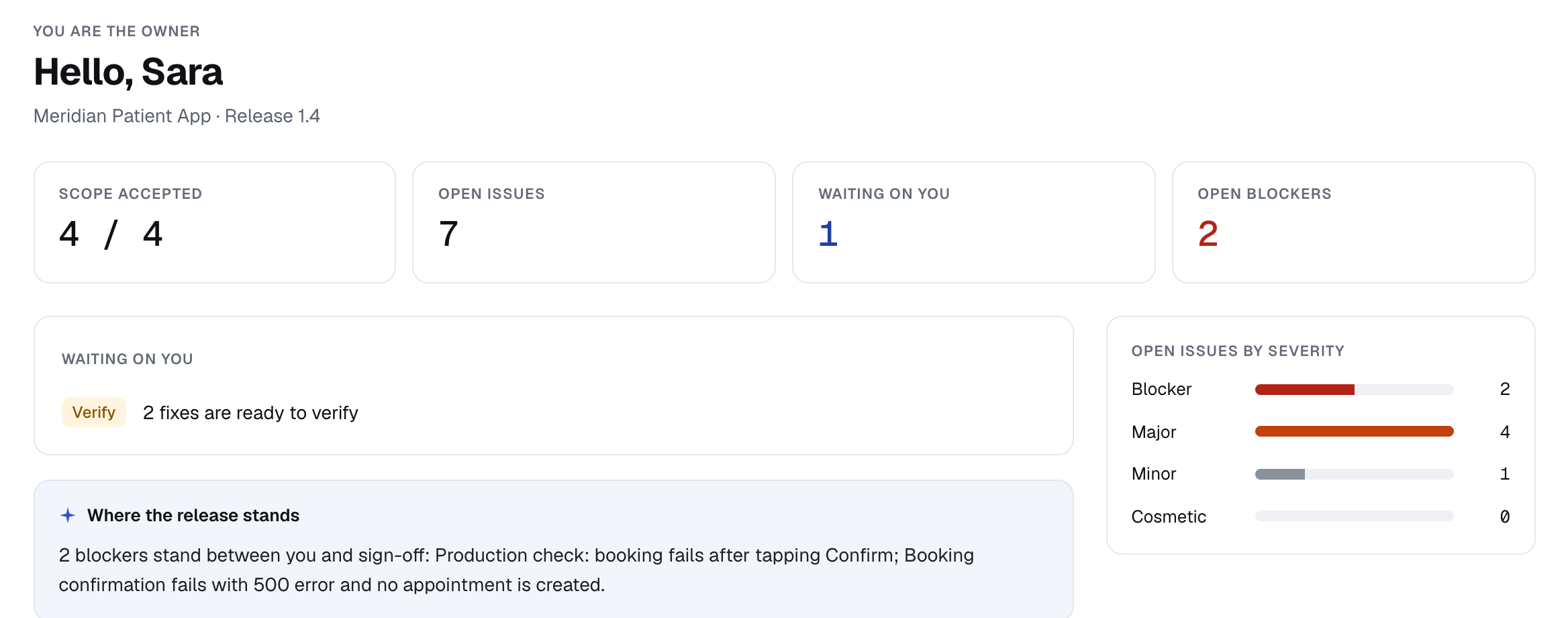
astratest.dev · Meridian Patient App · Overview
Project overview for the client: scope accepted, open issues, what's waiting on you, open blockers, and a summary of where the release stands
01
Clientowns scope and sign-off
02
Integratorgoverns delivery
03
Agencybuilds and fixes
04
Testersreport from the app
Why acceptance stalls

Most UAT is run on chat groups, spreadsheets and goodwill

Reports arrive as screenshots in a chat group

No device, no build, no steps. The agency spends a day reproducing each one, and half of them can't be.

Nobody can say if it's a bug or a change

The scope is a PDF from six months ago, and each side remembers it the way that suits them.

Status lives in someone's spreadsheet

With an integrator in the middle, a person spends the week chasing both sides for what's fixed.

Sign-off is a signature on a document

There's no record of what was tested, what failed, and what was accepted without a test.

The product

From statement of work to signed certificate, in one place

01 · Scope

The statement of work becomes the baseline

Paste the scope section of your SOW. Every numbered line becomes a requirement both sides can see, and every issue is later checked against it.

  • Numbered lines become scope items; headings become sections
  • Acceptance criteria for each item, drafted by Astra and edited by you
  • Flag anything vague as an ambiguity and settle it before testing
  • Lock the scope: nothing changes without everyone seeing it
astratest.dev · Meridian · Scope
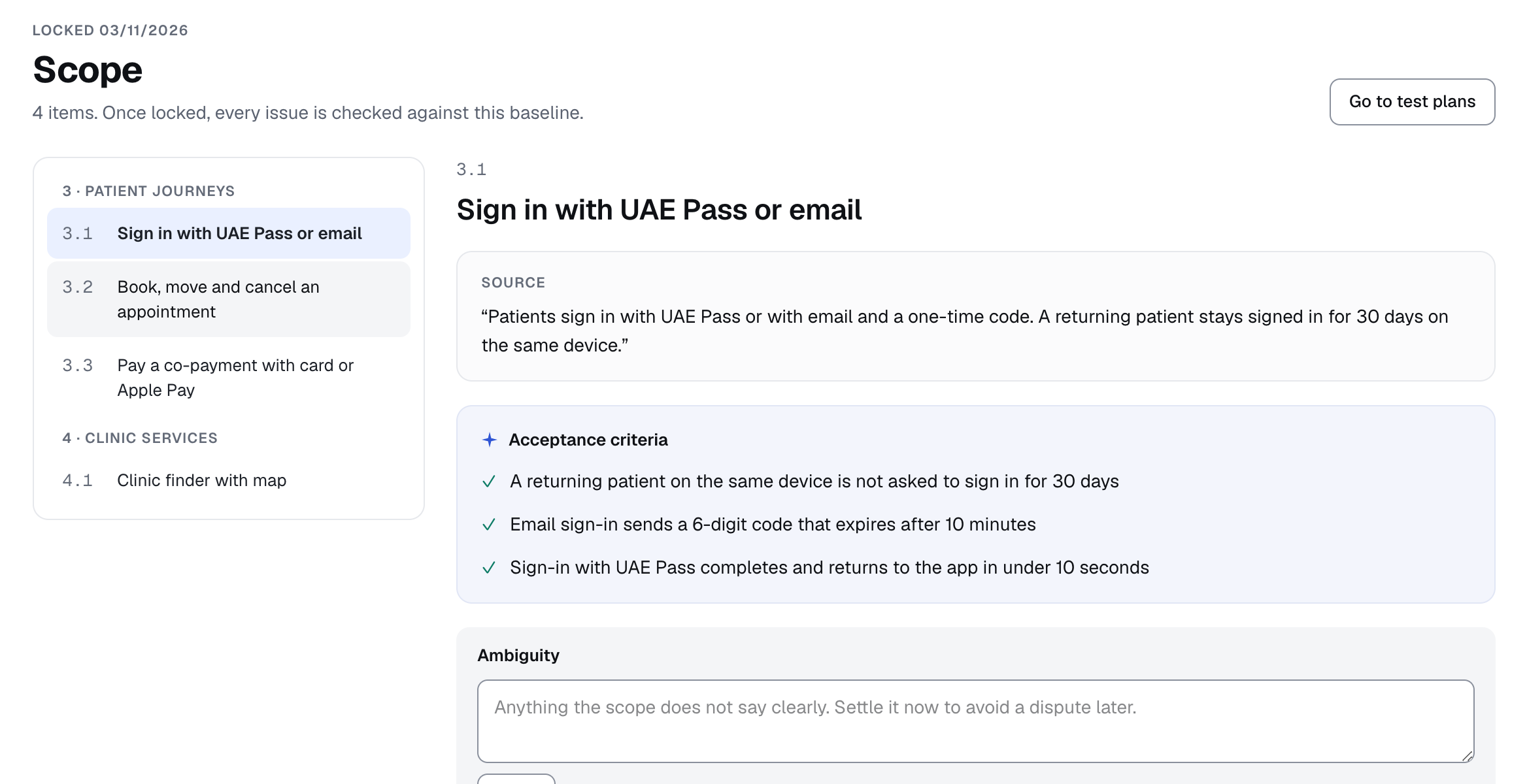
Scope screen: SOW items grouped by section, with the source text and acceptance criteria of item 3.1
02 · Test plan

A test case for every requirement, before anyone starts

Astra drafts test steps from each item's acceptance criteria. You edit them, add your own, and assign them to the people who'll run them.

  • One case per scope item, with numbered steps and expected results
  • Assign cases to testers from the client, the agency or both
  • Separate UAT, QA and beta groups
  • See at a glance which requirements still have no test
astratest.dev · Meridian · Test plans
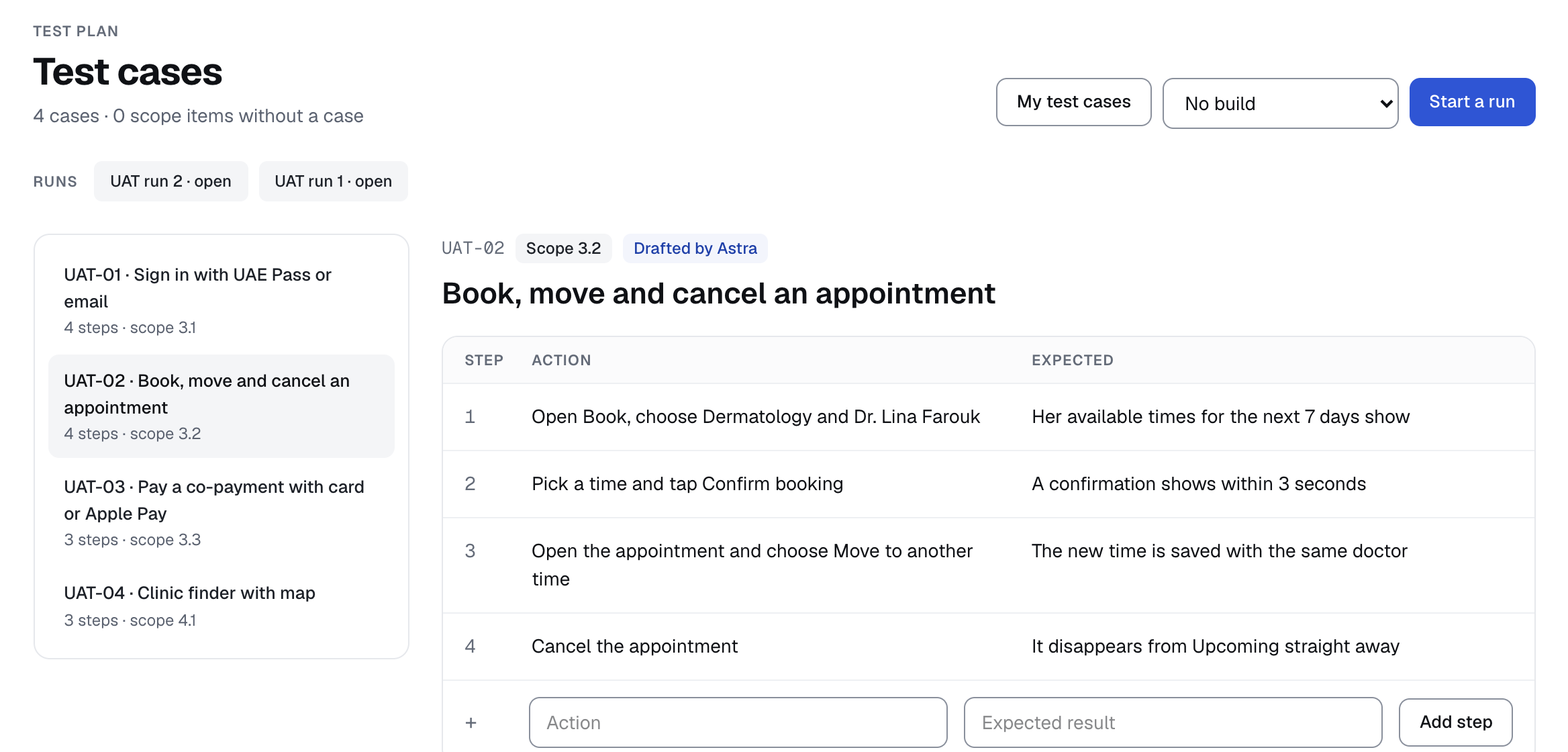
Test plan screen: four test cases, each linked to a scope item, with UAT-02's steps and expected results
03 · Test runs

Run the round against a real build

Start a run for the build under test. Testers record Pass, Fail or Blocked, and a failure becomes an issue already linked to its case and requirement.

  • Tie a run to the build under test
  • Fail opens a Major issue, linked to the case and the scope item
  • Live counts of passed, failed, blocked and not run
  • Progress shown as scope items accepted, the number sign-off needs
astratest.dev · Meridian · UAT run 2
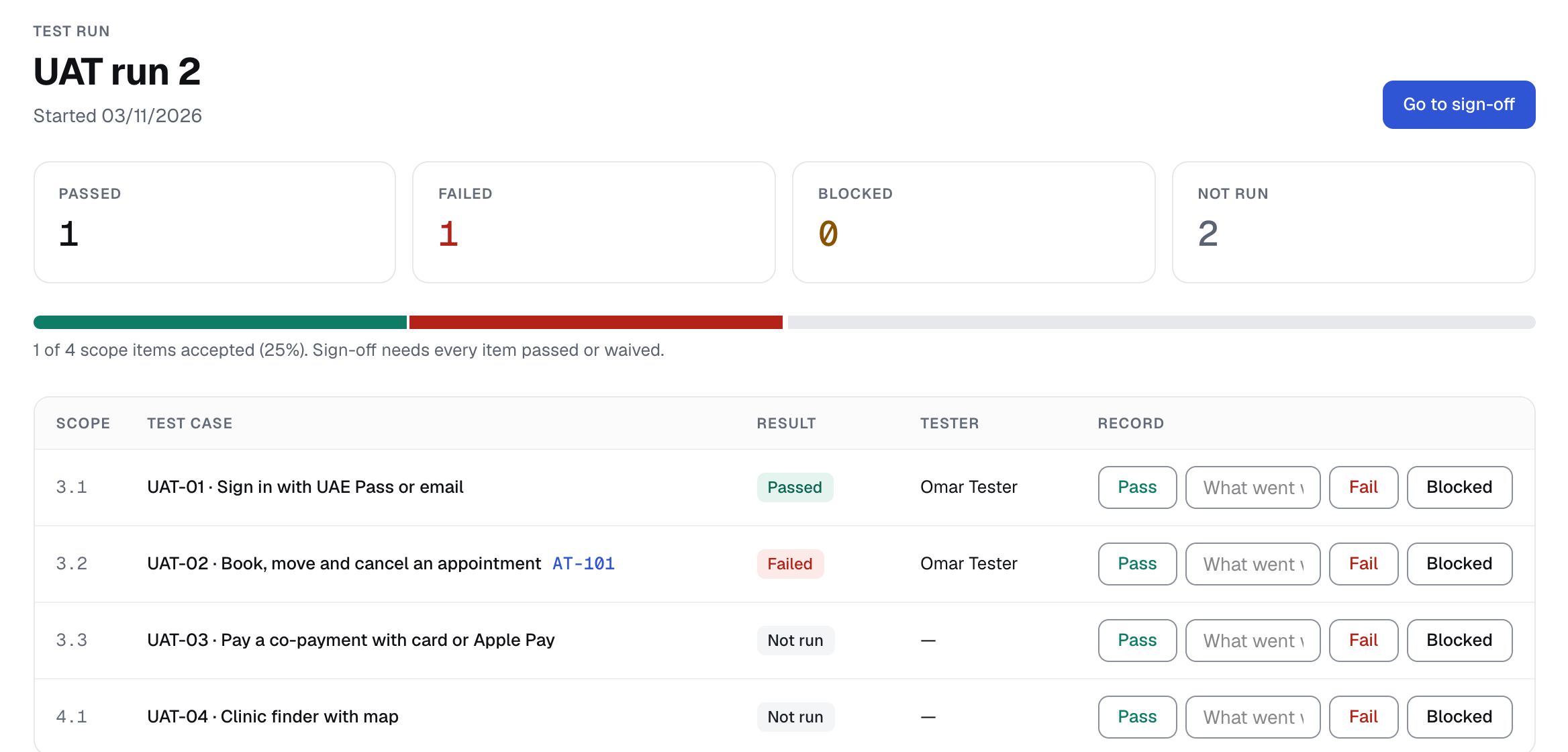
A test run: one case passed, one failed with a linked issue AT-101, two not run, and 25% of scope accepted
04 · Reporting

Testers report from inside the app

The agency adds one script tag to the UAT build. Testers point at what's wrong and say it in their own words. Everything a developer needs is attached for them.

  • Screenshot with the element they pointed at; password fields blanked
  • Recent network requests and console output
  • Device, browser, build and the page they were on
  • Astra writes steps, expected and actual, and matches it to the scope item it breaks
uat.meridian.health/book
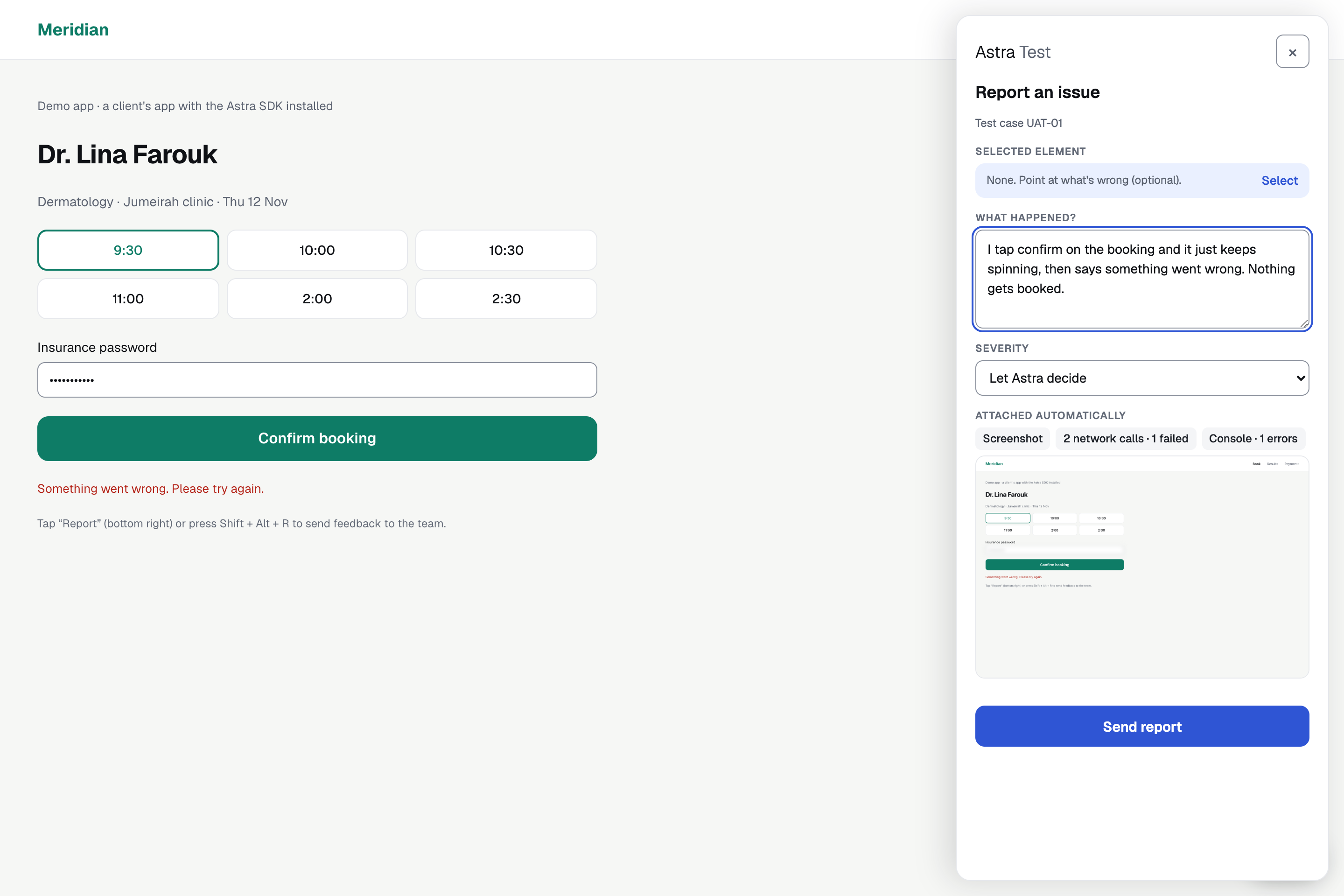
The Report panel open inside a test app, with the element, the tester's description and the attached evidence
05 · Disputes

Bug or change request, decided on the record

When the agency says something is a change, both positions are written down next to the clause it's about. The client, or the integrator, decides, and the reason stays with the issue.

  • Astra suggests a classification against the matching clause
  • Client and agency each state their position
  • Three outcomes: bug, shared change, or change request
  • The decision and its reason are visible to every party
astratest.dev · Meridian · AT-101
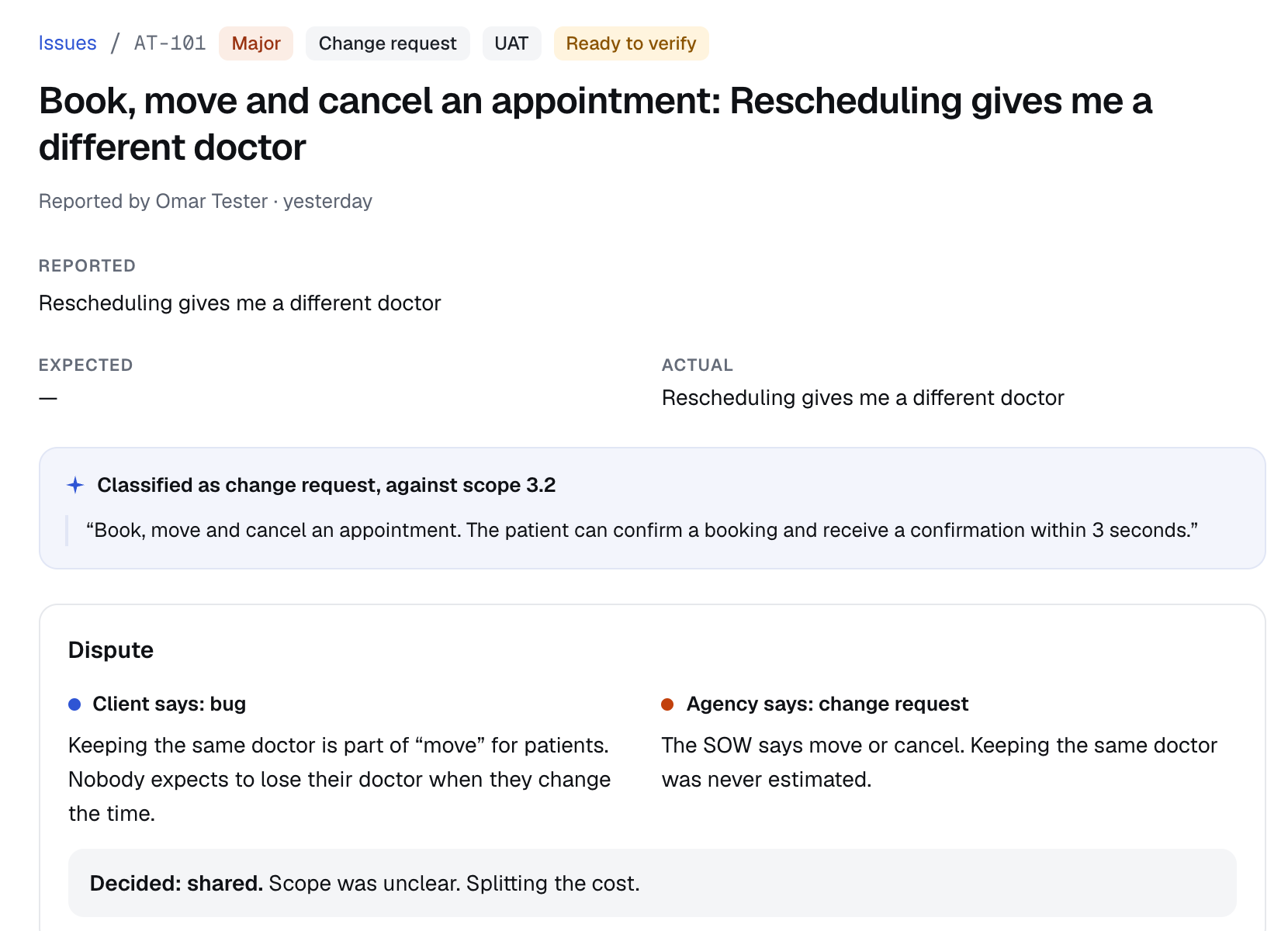
An issue classified as a change request against scope 3.2, with the client's and the agency's positions and the decision: shared
06 · Fix and verify

The agency fixes. Only the client closes.

One board for every party. Fixes are tracked to the build they ship in; promoting a build to UAT moves its fixes to Ready to verify, and only the client or integrator can pass them.

  • Builds appear on their own the first time they report
  • Promote a build and its fixes queue up for verification
  • Pass and close, or reopen with a note the agency sees
  • Optional: the agency's coding agent works the list over MCP
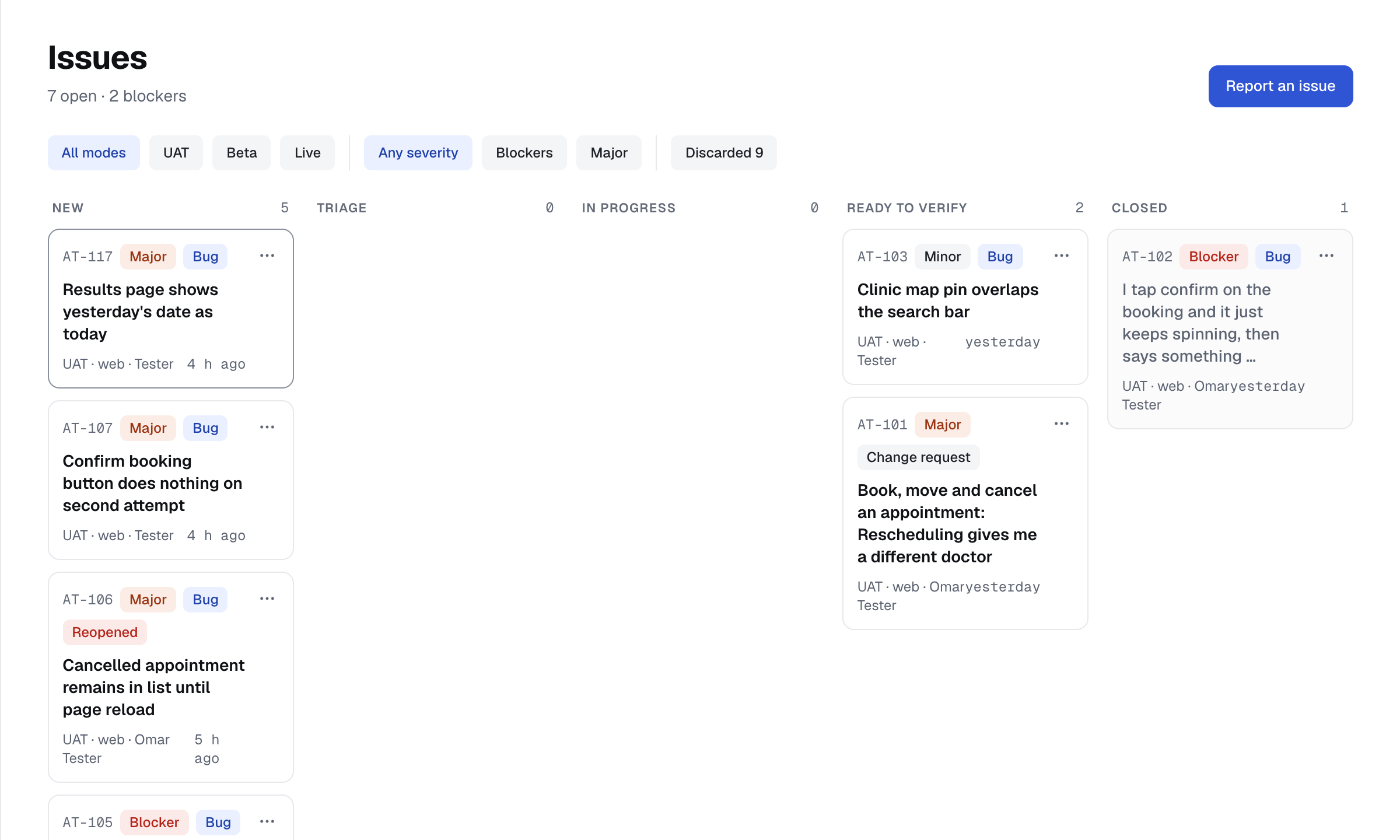
astratest.dev · Meridian · Issues
The issue board with New, Triage, In progress, Ready to verify and Closed columns, filtered by mode and severity
07 · Sign-off

A certificate every party signs

Sign-off opens only when every requirement has passed or been waived and no blockers are open. Each party signs with their name and title, and a numbered certificate is issued.

  • Checks: scope accepted, blockers and majors open
  • Waivers need a reason and record who approved them, and when
  • Each party signs; the certificate shows who and when
  • Every signature, waiver and status change is in the audit trail
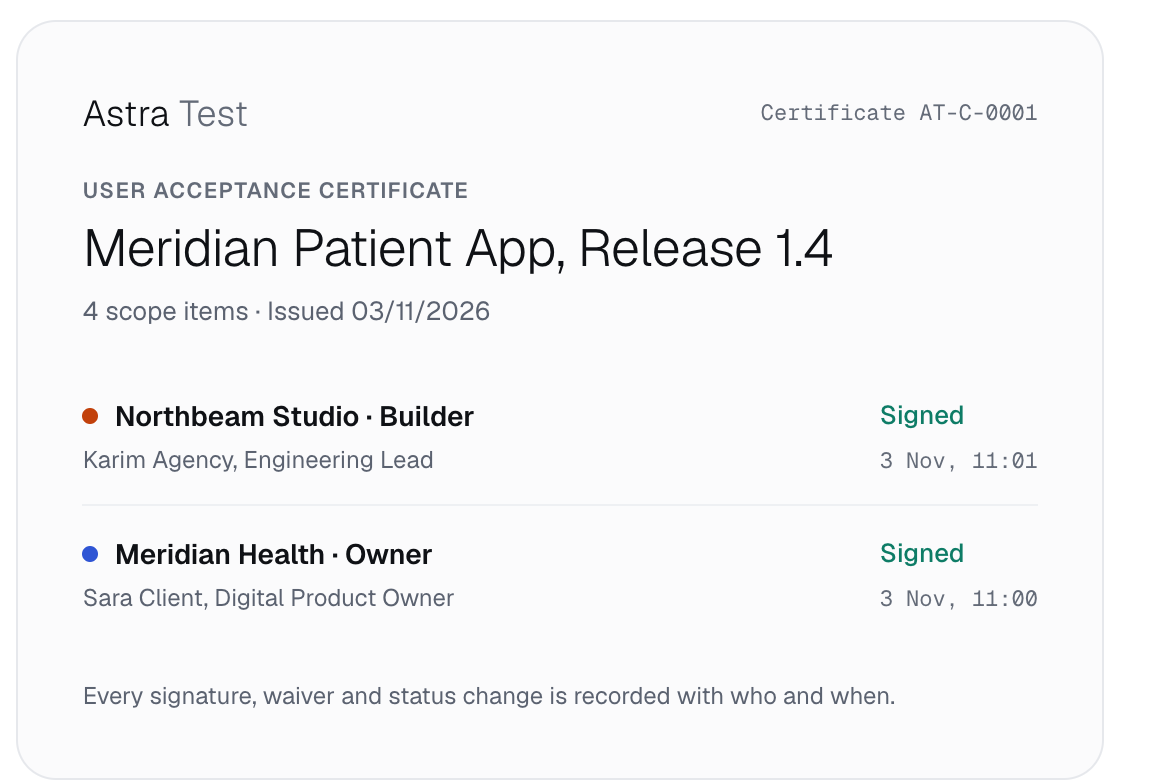
astratest.dev · Meridian · Sign-off
User acceptance certificate AT-C-0001 for Meridian Patient App release 1.4, signed by the builder and the owner
Who does what

Clear roles, enforced by the system

Two parties or three. Without an integrator, the client does their part. Each role sees what it needs and can only do what it should.

Owner

Client

Owns the scope and the budget. Verifies each fix, decides disputes when there's no integrator, and signs the release.

Lock scopeClose fixesDecide disputesWaive and sign
Governor · optional

Integrator

Runs delivery on the client's behalf, holds the agency to the plan, and decides disputes between them.

Close fixesDecide disputesSign
Builder

Agency

Installs the script, fixes what's reported, says which build each fix ships in, and signs the certificate.

Fix and commentDispute a classificationShip buildsSign
UAT · QA · Beta

Testers

Run the cases they're given and report from inside the app. No training, no new tool to learn.

Run casesReportConfirm fixes
Governance

A record that holds up when someone asks

Acceptance is a commercial decision. Astra Test keeps the evidence for it.

Audit trail
Every status change, decision, waiver and signature is recorded with who and when.
Role-based permissions
Enforced by the database, not the interface. An agency can't close its own fix, and nobody else can sign for you.
Hosted in the EU
Servers in Germany and the database in Ireland, for reports, screenshots and records alike.
Private by default
Password fields are blanked in screenshots and request bodies are never recorded. Mark anything else private with one attribute.
Works with your tracker
Each issue carries a tracker reference for its Jira or Azure DevOps ID, so nothing has to move.
Coding agents, under control
If the agency uses one, it gets a token for this project only. It can't close, and revoking the token cuts it off at once.
Talk to us

Planning a UAT? Tell us about it.

We’ll set up a short call, walk your team through a project like yours, and help you write the SDK and sign-off into the agency’s contract.

We reply by email. Privacy
Pricing

Priced per project

Free for your first year during early access. After that, Engagement is $490 per project per month while testing runs, for up to 25 testers; larger setups get a yearly contract. The agency always joins free.

Every project includes
  • Scope import, acceptance criteria and locking
  • Drafted test plans and test runs
  • In-app reporting with evidence
  • Disputes, verification and the signed certificate
  • Client, integrator, agency and their testers
Start a project

Questions

Who pays, the client or the agency?+

Usually the client, and the agency joins free. An agency can also run a project for its own client.

We already use Jira or Azure DevOps.+

Keep it. Astra Test is where acceptance happens: each issue holds the ID of its ticket in your tracker, and the agency works in whichever tool it prefers.

What kinds of apps can we test?+

Web apps, iPhone and iPad, Mac, Android, Flutter and React Native. The agency adds one script tag or package to the UAT build, and testers report from inside it.

Do we need an integrator?+

No. Two parties work fine; the client then decides disputes. Add an integrator when one is governing delivery.

Can the agency mark its own work as done?+

It can mark a fix ready. Only the client or the integrator can pass it and close it.

Run your next UAT here.

Create the project, invite the agency, and paste in the scope. Testing can start the same day.

Start a project
Astra Test Enterprise: user acceptance testing that ends in a signature